In the digital world, computers are indispensable, but many people confuse hardware and software. While they work together seamlessly, they are fundamentally different. Understanding these differences is crucial for anyone interested in technology, whether you are a student, professional, or tech enthusiast. This guide will break down everything you need to know about hardware and software in an easy-to-understand way.
Read More: https://newstaxes.com/inspiring-guide-to-its-role-in-computers/
What Are Hardware and Software?
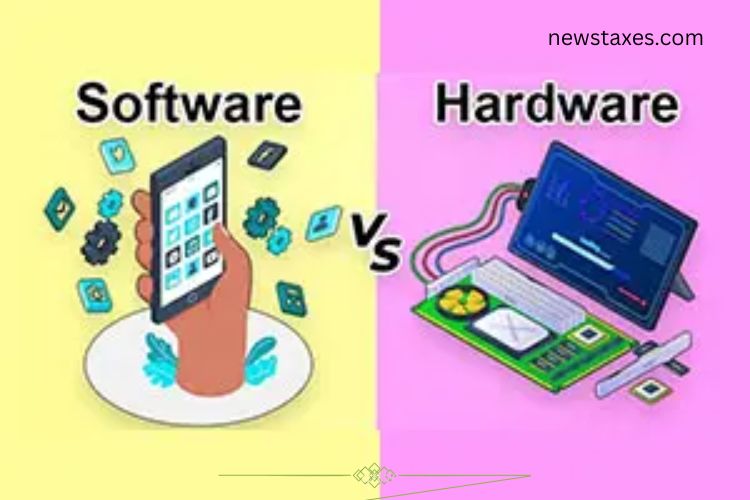
A computer operates through the combined effort of hardware and software. Hardware refers to the physical components of a computer—the parts you can touch and see. Examples include keyboards, monitors, hard drives, and processors.
Software, in contrast, is intangible. It consists of programs and applications that instruct the hardware on what to do. Software cannot be physically touched; it exists digitally and is visible only on screens. Examples include operating systems, browsers, and productivity tools.

Tangible vs. Intangible
The most fundamental difference between hardware and software is tangibility.
- Hardware: You can physically interact with it. A mouse, CPU, or monitor is tangible and essential for the computer to function.
- Software: It is intangible. You can see it only through its interface on a screen, like Microsoft Word or Google Chrome. Software controls and manages hardware, giving it purpose.
Function: How They Work
Both hardware and software are essential, but their functions differ:
- Hardware: Acts as the body of the computer. It enables actions like typing, clicking, viewing, and listening. Hardware is useless without software to instruct it.
- Software: Acts as the brain. It gives instructions to hardware to perform specific tasks, like creating documents, browsing the web, or running games.
Together, they create a functional computer system.
Upgrades: Keeping Things Current
Upgrading hardware and software ensures better performance, but the methods differ:
- Hardware Upgrades: Require physical replacement or addition of parts, such as installing extra RAM or a new hard drive. These upgrades often require technical expertise and investment.
- Software Upgrades: Simple and fast. Installing updates or patches improves performance and adds features. It usually takes minutes and can be done without opening the computer.
Cost Comparison
Cost is another key distinction:
- Hardware: Generally more expensive because it involves physical parts. Prices can increase with repairs or replacements.
- Software: Usually cheaper and sometimes free. Digital downloads and cloud services make software affordable and easily accessible.
Dependence: How They Rely on Each Other
Hardware and software cannot function independently:
- Hardware: Cannot operate without software. A monitor or keyboard has no purpose unless software tells it what to do.
- Software: Cannot run without hardware. Applications need physical devices like a CPU, memory, and storage to execute tasks.
This interdependence is what allows computers to perform complex operations efficiently.
Modification: How Easily They Can Be Changed
The ability to change or improve hardware and software varies:
- Hardware: Modifications are often complex and costly. Broken or outdated parts may need replacement rather than repair.
- Software: Highly flexible. Programs can be updated, patched, or customized with a few clicks. These updates often improve functionality or add new features.
Failure: Common Reasons for Malfunction
Both hardware and software can fail, but the causes differ:
- Hardware: Physical damage or wear and tear. Dropping a laptop can crack the screen, while a hard drive can fail over time. Repair or replacement is necessary.
- Software: Errors, bugs, or outdated programs cause failure. Crashes, freezes, or slow performance can often be fixed by updates or reinstalling the software without replacing hardware.
Storage: How Data Is Saved
Storage is handled differently by hardware and software:
- Hardware: Stores data physically in hard drives, SSDs, USB drives, or other storage devices. These components can be touched and removed.
- Software: Stores data digitally within hardware memory. Files, applications, and system information exist in virtual form, which cannot be physically handled but is critical for the computer’s operation.
Durability: Lifespan of Hardware and Software
Durability is an essential consideration for both:
- Hardware: Physical components are prone to wear and tear. Over time, parts like keyboards, screens, or hard drives may fail. Proper care can extend life, but eventual replacement is inevitable.
- Software: Doesn’t physically degrade. Its lifespan depends on updates, compatibility, and technological advancements. Software can remain functional indefinitely if maintained properly.
Real-Life Examples of Hardware and Software
Understanding examples clarifies the difference further:
Hardware Examples:
- Keyboard: Used to input data physically.
- Monitor: Displays output from the computer.
- Hard Drive: Stores data physically for retrieval.
- CPU: The brain of the computer that executes instructions.
Software Examples:
- Microsoft Word: Helps create documents.
- Google Chrome: Enables internet browsing.
- Antivirus Programs: Protects against malware.
- Operating Systems: Windows, macOS, and Linux manage hardware and provide an interface for applications.
Key Takeaways
- Tangible vs. Intangible: Hardware is physical; software is digital.
- Function: Hardware performs tasks physically; software instructs hardware.
- Upgrades: Hardware upgrades are physical; software updates are digital.
- Cost: Hardware is costlier; software is often affordable or free.
- Dependence: Both require each other to function.
- Modification: Hardware changes are harder; software updates are easier.
- Failure: Hardware fails physically; software fails digitally.
- Storage: Hardware stores physical data; software stores digital data.
- Durability: Hardware wears out; software lasts longer with updates.
By understanding these differences, users can make informed decisions about purchasing, upgrading, and maintaining their computer systems. Whether building a new PC or selecting the right software, knowledge of hardware and software helps maximize performance and efficiency.
Frequently Asked Questions:
What is the main difference between hardware and software?
Hardware refers to the physical components of a computer, like a keyboard or CPU, while software consists of programs and applications that give instructions to the hardware.
Can software exist without hardware?
No. Software needs hardware to run because it relies on physical devices like a processor, memory, and storage to function.
Is hardware more expensive than software?
Typically, yes. Hardware involves tangible parts that require manufacturing and maintenance, whereas software is mostly digital and can often be free or low-cost.
How do hardware and software upgrades differ?
Hardware upgrades require physical replacement or addition of parts, while software upgrades are usually fast digital updates that improve performance or add features.
Can hardware fail without software issues?
Yes. Hardware can fail due to physical damage or wear and tear, such as a broken screen or hard drive malfunction, independent of software functionality.
Can software fail without hardware problems?
Yes. Software can crash, freeze, or develop bugs even if the hardware is functioning properly. Updates or reinstalling the software usually resolves these issues.
Are hardware and software dependent on each other?
Absolutely. Hardware cannot perform tasks without software instructions, and software cannot operate without the physical resources provided by hardware.
Conclusion
Understanding the difference between hardware and software is essential for anyone navigating the digital world. Hardware provides the physical foundation of a computer, while software delivers the instructions that make it functional. Both are interdependent, yet their characteristics, costs, upgrades, and lifespans differ significantly. By knowing how hardware and software work together, tech enthusiasts can make smarter decisions, troubleshoot effectively, and optimize their systems for better performance. Mastering this knowledge is key to becoming confident and efficient in using technology.